Batch Processing Consumed Messages
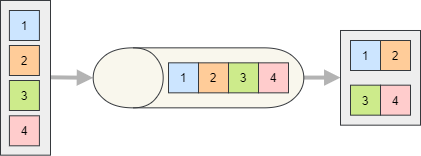
Process multiple consumed messages in a single batch to reduce per-message overhead (DB commits, network IO, etc.). Use batching when throughput matters and a small additional latency is acceptable.
Consumer Configuration
Enable batch processing by calling EnableBatchProcessing on the consumer endpoint.
services.AddSilverback()
    .WithConnectionToMessageBroker(options => options.AddKafka())
    .AddKafkaClients(clients => clients
        .WithBootstrapServers("PLAINTEXT://localhost:9092")
        .AddConsumer("consumer1", producer => producer
            .Consume<MyMessage>("endpoint1", endpoint => endpoint
                .ConsumeFrom("my-topic")
                .EnableBatchProcessing(1000, TimeSpan.FromSeconds(30))));
Subscribing to Batches
Your subscriber can consume a batch of messages as an IAsyncEnumerable<T> (or IEnumerable<T> / IMessageStreamEnumerable<T>) of either the message type or the IInboundEnvelope<TMessage>.
public async Task HandleAsync(IAsyncEnumerable<MyMessage> messages)
{
    await foreach (MyMessage msg in messages)
    {
        // process each message
    }

    // commit once for the whole batch
    await _db.SaveChangesAsync();
}
public async Task HandleAsync(IAsyncEnumerable<IInboundEnvelope<MyMessage>> envelopes)
{
    await foreach (IInboundEnvelope<MyMessage> envelope in envelopes)
    {
        if (envelope.IsTombstone)
            // delete the related entity
        else
            // create or update the entity
    }

    // commit once for the whole batch
    await _db.SaveChangesAsync();
}
Important
All messages in the batch are acknowledged/committed once the subscriber successfully completes. If the subscriber throws, the configured error policy applies to the whole batch.
Note
With Kafka, a batch per topic partition is created by default. You can decide to process all partitions together by calling ProcessAllPartitionsTogether on the endpoint configuration and that will create a single batch for the whole topic.